Purpose approvers
Approve expenses for your purpose
Find reports waiting for you, check expenses and receipts, and approve or reject a report.
Open your approvals
Open reimbursements and sign in. On your first visit, complete your personal payment settings to enter the reimbursement section, even if you are only reviewing claims.
Open Approvals. Awaiting your approval appears first and contains reports you can review now. Active reports shows the other reports you can see for your purposes. Paid, cancelled, and archived reports are under Show older.
Review a report
- On mobile, open the report using its number or choose View report from its three-dot menu. On a computer, use its number or the eye icon.
- Check the purpose, expense dates, categories, descriptions, GST treatment, and amounts.
- Open each receipt using its eye icon and check it supports the amount claimed. Someone may claim part of a receipt or split it across categories.
- Check Activity for the submission and any previous decisions.
Claimants see their own reports. Purpose approvers can see submitted reports for their assigned purposes. Bank details are available to finance, not purpose approvers.
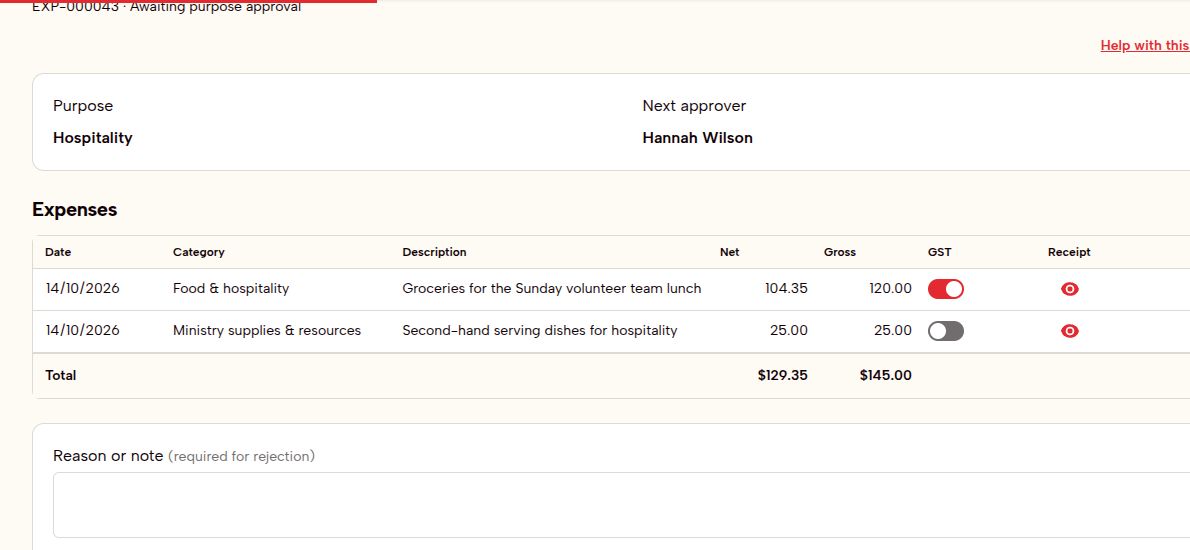
Approve
Choose Approve when the report is ready. It then goes to finance approval. Your approval does not mark it as paid.
Reject
Enter a clear reason in Reason or note, then choose Reject. Explain what the claimant needs to fix.
The claimant can edit and resubmit. A resubmitted report starts the approval process again, including purpose approval.
Assignment and reminders
Pending approval follows the person currently assigned to the purpose. If that assignment changes, the new approver handles pending reports. An approval already given remains complete.
If you are the claimant and would normally approve the report yourself, it goes to the configured senior pastor instead. Claims from the senior pastor use the configured alternate approver.
Email reminders are sent every two days while approval is pending. Open the report and approve or reject it to complete your review.
If the claimant makes changes
A claimant can return a report to draft before finance approval is complete. Current approvals are disregarded, and you will need to review it again after they resubmit.
An archived report stops moving through the process. It cannot be approved while archived.